
For this introduction I am reaching back more than forty years. My friend who played the Waltz in F# Minor, thought it to be an unpublished work of Chopin’s. However, according to musicologists it is not. Also known as Valse Mélancolique the composition is listed as “spurious” here.
From the amateur’s point of view, the piece manifests two very positive qualities. First, it has a pleasing and rather sad melodic line, and second, it is playable! I would guess it to be about piano grade 4 or 5.
Forty years ago my friend transcribed the piece from memory to paper--he had only himself heard it played years before then, by a fellow music student. This morning I keyed the notes from his transcription (mouse-clicked them) into MuseScore. This exercise created a copy of someone’s recollection of someone else’s memory, perhaps a little like the rumor that passes around the room.
The MuseScore source (.mscz format) may be downloaded from here, and a PDF from here. The first line, as it appears in the MuseScore editor, is shown below:

I would like to learn about the true origins of this piece, if they are known, how it came to be associated with Chopin, and how it was ascertained to be spurious.
Music Engraving
As a programmer and also a music lover I became
interested in what seemed an obvious application of computers to the
chore of writing or transcribing music. The first music editing
application that I experimented with--more than ten years ago--was Lilypond,
which claimed to produce beautiful output--a claim that I think is true. I had no concept at the time how difficult it is to produce even reasonable output, let alone
beautiful engraving. Lilypond was not easy to use. The application had no graphical user
interface. Notes and other markings had to be entered as text. However,
I
had previously used the typesetting language TeX, and was not
immediately put off
by the lack of a graphical interface. Since the time of my first
experience with Lilypond one or more graphical editors have become
available as accessories or plug-ins. For that matter my current favorite music notation application MuseScore can
optionally generate Lilypond source files, though said to be incomplete. These generated
sources are awkward to edit, but potentially instructive.
Lilypond was not easy to use. The application had no graphical user
interface. Notes and other markings had to be entered as text. However,
I
had previously used the typesetting language TeX, and was not
immediately put off
by the lack of a graphical interface. Since the time of my first
experience with Lilypond one or more graphical editors have become
available as accessories or plug-ins. For that matter my current favorite music notation application MuseScore can
optionally generate Lilypond source files, though said to be incomplete. These generated
sources are awkward to edit, but potentially instructive.Here is a sort-of random comparison. By default, MuseScore beams 8th notes in pairs, even in 3/4 time. While there may be no hard and fast rule about this, in my experience it is more common for printed music to beam across the group of 6 notes. Interestingly that is what Lilypond does with the unedited .ly source that MuseScore generates.

The illustration above shows MuseScore (left) and Lilypond (right). The Lilypond output was produced from an .ly file generated by MuseScore. (I have stretched the Lilypond image slightly to make the staffs the same vertical size.)
It would be trickier still to beam across staffs. First you have to get the voices right.
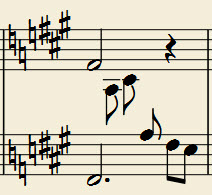
In the example above I deleted an eighth note rest in the second voice--probably should have “hidden” it instead. In any case I do not know how to cause MuseScore to beam the five 8th notes between staffs. Maybe they should not be beamed together or maybe it does not matter. The generated .ly has it the same.
Only an expert could aspire to produce an engraving that matches those produced by artisans. Certainly, I could not. Years ago when first tinkering with Lilypond I attempted to recreate as closely as possible a moderately dense example consisting of two measures.

The left-hand side is scanned from published sheet music, which I presume was hand-set by a master engraver. It is very good, though not perfect.
The right-hand side was generated from Lilypond source commands entered as text. Some things are probably correctable without extreme difficulty, such as moving the pp and ppp dynamics a little to the left, so that they do not cross a note stem or slur; or similarly moving the tempo indication up and to the left, etc. But this was not a graphical interface. It was not possible simply to select and slide the markings! I remember struggling with the diagonal line (missing from the Lilypond exhibit). A slur is also missing from the low e-flat to the e-flat of the tremolo in the second measure--I do not recall why that was problematic or even what it would mean.
Someone with more experience could correct these and similar errors, thus improving the overall appearance. Lilypond does indeed produce beautiful output when the input is good. However, program-generated engravings do not often compare favorably to the nearly perfect spacing and pleasing visual balance of expert hand-engravings, in my opinion.
Other Programs
I have used the light version of Finale (called “Notepad”) and a full version of Sibelius. I also tried out Mozart, but not enough to form any conclusion. Finale and Sibelius might be considered the top two commercial programs. A friend of mine uses Finale extensively for church music, primarily for writing four-part choral scores, and finds the program entirely satisfactory.
Perhaps it would be best to consider input and output as separate problems or separate solutions. Viewed in that light (and if I am the judge), Sibelius wins the input contest, and Lilypond the output competition.

The preceding illustration is from Sibelius. But, Sibelius is expensive, a significant investment for non-professional or home use. MuseScore by contrast is free!
Wrap-up
 Thus far I have not encountered any oddity in MuseScore
that could not be fixed. For example, the default tie mark between the
first two notes of an eighth-note triplet is too small--It is like a
tiny smudge. But this is easily corrected. Simply zoom to about 400
percent, then stretch the tie mark’s
handles to an appropriate size and shape. It is not necessary to do
this for every similar tie. For subsequent ones, copy and paste the
first. Since the copied mark has normal size it can be moved or
adjusted as needed without zooming. (Both marks in the illustration have been edited.)
Thus far I have not encountered any oddity in MuseScore
that could not be fixed. For example, the default tie mark between the
first two notes of an eighth-note triplet is too small--It is like a
tiny smudge. But this is easily corrected. Simply zoom to about 400
percent, then stretch the tie mark’s
handles to an appropriate size and shape. It is not necessary to do
this for every similar tie. For subsequent ones, copy and paste the
first. Since the copied mark has normal size it can be moved or
adjusted as needed without zooming. (Both marks in the illustration have been edited.)Any of the main music notation or engraving programs can likely be made to produce acceptable output for ordinary input, provided the user has sufficient knowledge and experience with the application. Intuitiveness of the data input interface becomes the most important factor in determining the time required to complete a project, assuming the project does not involve rare or complex notational elements. Of course, what is intuitive to one person is not necessarily so for another. That said, I feel that MuseScore and Sibelius both have well-designed user interfaces. Sibelius is exceptionally well-documented, and one can usually find the answer to any puzzling MuseScore question on-line.